<?xml version="1.0" encoding="utf-8"?><feed xmlns="http://www.w3.org/2005/Atom"><title>Frgo.org Weblog</title><subtitle>A weblog for frgo.org: games and fun games.</subtitle><link href="https://frgo.org/blog/" rel="self" /><link href="https://frgo.org/" rel="alternate"/><id>frgo-org-blog</id>		
<entry><title>Calculator Dictionary</title><link href="https://frgo.org/blog/post?id=25" rel="alternate"/><id>frgo.org-blog-post-id-25</id><published>2026-10-23T03:12:17+00:00</published><summary>Calculator Dictionary</summary><content type="html"><![CDATA[ <h1>Calculator Dictionary</h1>
<p>Hello.</p>
<p>It's been a while since I've done much with the site, so I thought I'd start off with a good blog post.</p>
<p>As a Junior in High School, you have to take a lot of standardized tests. Last week, I took the <em>ACT</em>, and just today I took the <em>PSAT</em> at school. </p>
<p>One thing I noticed when reading all those rules was that they explicitly state that a calculator is permitted <em>only in the math section</em> of the exam.</p>
<blockquote>
<p><em>I added a thing so you can click on an image in a blog post to make it big! Try it!</em></p>
</blockquote>
<p><img src="https://frgo.org/public/blog_image_uploads/act_calculator_policy.png" alt="ACT Calculator Policy" />
<em>The ACT Calculator Policy</em></p>
<p>This got me thinking: why wouldn't calculators be allowed on the reading section? My first thought was that you might be able to store a dictionary on the calculator, thus cheating on the vocabulary questions. My second thought, naturally, was about how I could do this (the dictionary part, not the cheating part).</p>
<h2>"Making" the Dictionary</h2>
<p>Obviously, if you want to make a dictionary, the first thing you need to do is take someone else's dictionary. But then you have to read it with code, somehow. <em>EPUB</em> files are nice because they are just <em>zip</em>ped up html files, making them easy to parse. Instead of writing a script myself to parse these, however, I asked <em>Claude</em> to make the script for me.</p>
<p>I haven't been very into doing stuff with AI, and honestly, I'm not sure how I feel about it. The way I'm looking at it now is that AI is just a way to boost my productivity. I <em>could</em> have written a script to parse the dictionary myself, it just might have been a little different. It would have taken a lot longer, too. This is the first real thing I've ever done using AI, so it's interesting to think about. <em>For now, I'm sticking to the ethos that things posted on the site (games, apps, backend, etc.) should be human-written in entirety or near-entirety.</em></p>
<p>So, anyways, I parsed this dictionary ebook with this script, and it produced a <em>jsonl</em> file with all the words, definitions, etc. from the dictionary. I had actually done this last week as an unrelated project (not thinking about the calculator), and just decided to put it onto the calculator after taking <em>PSAT</em> today. </p>
<p><img src="https://frgo.org/public/blog_image_uploads/frog_dictionary_entry_json.png" alt="Sample of the JSONL" />
<em>Part of the entry for Frog in the output dictionary file</em></p>
<h2>Putting it on the Calculator</h2>
<p>The next part of my scheme was to put the dictionary on the calculator. I have a <em>TI Nspire CX-II CAS</em>, which, ironically, isn't even allowed on these exams (the <em>CAS</em> part). Like its non-<em>CAS</em> counterpart (which is allowed on the exams), it can run Python and has a lot of storage.</p>
<h3>Getting ready to put them on the calculator</h3>
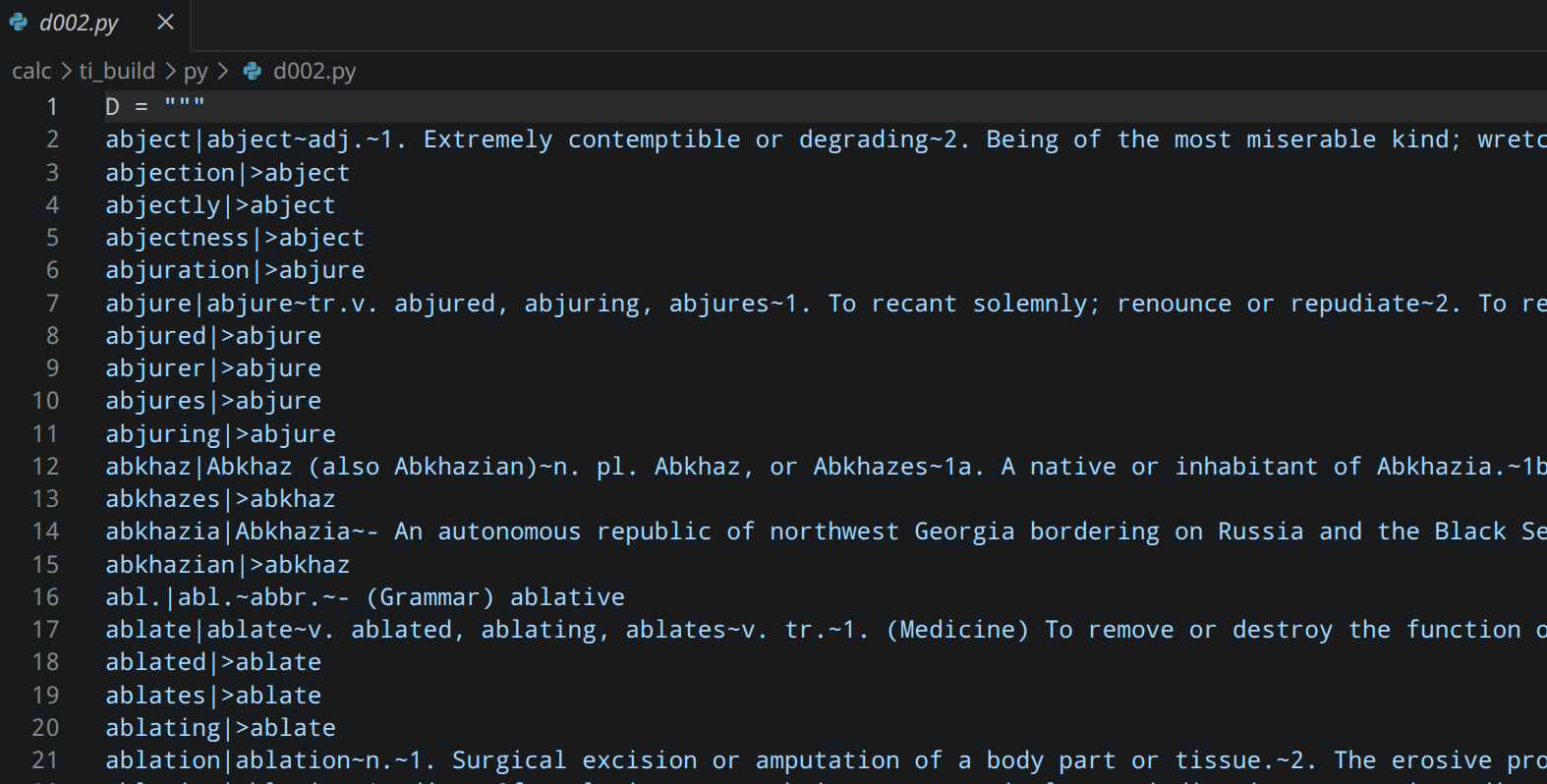
<p>The micropython packaged in the Nspire has severe restrictions in that it can't open files and the calculator itself has pretty low memory for a modern device. Thus, I decided to split the dictionary into many small files.</p>
<p>In hindsight, I could have probably made much larger files and had fewer of them. Instead, I split the dictionary into about 560 files, each around 16 kB. These files were just python scripts that loaded large sections of the JSON as a string.</p>
<p><img src="https://frgo.org/public/blog_image_uploads/d002_py.png" alt="Example of the small dictionary chunk files" />
<em>Here's d002, the third of the dictionary chunks.</em></p>
<p>These files are then loaded onto the calculator and treated as python modules which can be imported. The AI then modified a program I'd already had to search for a dictionary entry to function on the Nspire with this dynamic import system.</p>
<p>Lastly, all of these had to be converted to <em>tns</em> files, <em>Texas Instruments</em>' proprietary Nspire document format. I did this using the <a href="https://github.com/ndless-nspire/Luna">Luna</a> tool.</p>
<blockquote>
<p>You can check out the files <a href="https://drive.google.com/drive/folders/1TnX5j-yh1ODA_zSPLz6CV0TyUEbhDIFn?usp=sharing">here</a></p>
</blockquote>
<h3>Actually putting them on the calculator</h3>
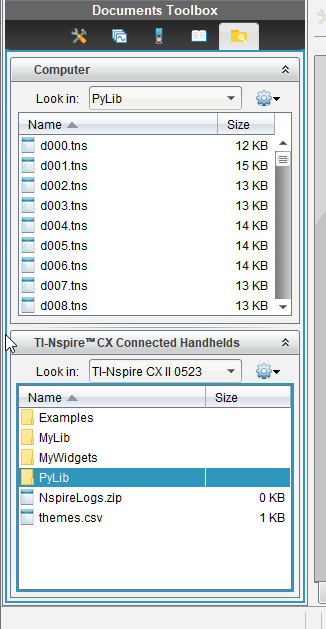
<p>I used the TI Nspire CX Student Software to put the files on the device. Unfortunately, this software is only supported on Windows and Mac. Even more unfortunate, it requires a <em>license</em> to use. Luckily, my calculator came with a license code in the box.</p>
<p>Once I got that software activated, I easily loaded all the 500 or so files onto the calculator. Because the dictionary is a bunch of python modules, it needs to go in the <em>PyLib</em> folder.</p>
<p><img src="https://frgo.org/public/blog_image_uploads/nspire_student_software.png" alt="Nspire Student Softwware" />
<em>Nspire Student Software</em></p>
<p>Once these files are loaded into the PyLib folder, and the actual script (lookup_word) is wherever you want it to be, refresh the libraries by pressing [menu], [refresh libraries (b)] from the <em>Browse</em> menu of the calculator.</p>
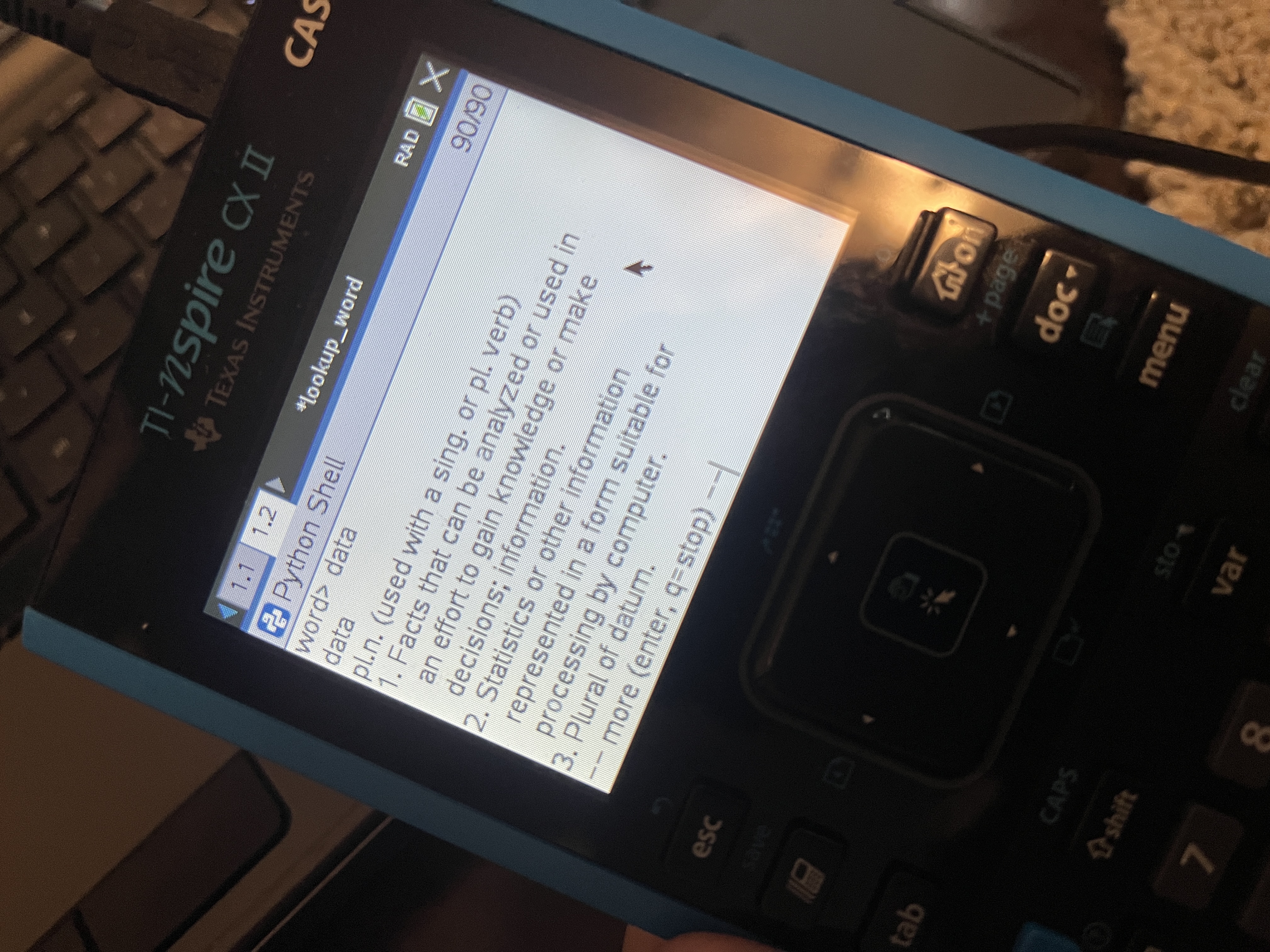
<p>Now you're done. Just run the script, type the stuff in, and you have a dictionary on your calculator. There are constants at the top defining characters per line and lines per page to be shown (that the AI wrote, I would never write code so neat) that you can change if you want to.</p>
<p><img src="https://frgo.org/public/blog_image_uploads/calculator_dictionary_demo.jpg" alt="Data" />
<em>Definition of <strong>Data</strong></em></p> ]]></content><author><name>admin</name></author></entry><entry><title>Helpful Information</title><link href="https://frgo.org/blog/post?id=23" rel="alternate"/><id>frgo.org-blog-post-id-23</id><published>2026-04-17T13:19:49+00:00</published><summary>Helpful Information</summary><content type="html"><![CDATA[ <h1>Hello All</h1>
<p>Hello all. I am <em>Mr. Frgo</em>.</p>
<p>You may have noticed that my first blog post was wrong. This was because I made it before actually implementing all of the features.</p>
<p>It speaks of 'editing frgavatars'. At the moment, you can't edit frgavatars. This is because I didn't add the functionality to do so. </p>
<p>You may have noticed that some users have frgavatars (as seen on the <em>Competitive Frog (like snake)</em> leaderboards). Do not concern yourselves with this. In time, a feature will be added allowing users to customize their own frgavatar. Just not yet.</p>
<p><img src="http://frgo.org/games/frgoparty/frgo.jpg" alt="frgo.jpg" /></p>
<p>Good luck on your future endeavors</p>
<p>- <em>Mr. Frgo</em></p> ]]></content><author><name>admin</name></author></entry><entry><title>Nevermind</title><link href="https://frgo.org/blog/post?id=22" rel="alternate"/><id>frgo.org-blog-post-id-22</id><published>2026-04-10T02:10:09+00:00</published><summary>Nevermind</summary><content type="html"><![CDATA[ <h1>Haha, so you saw that last post...</h1>
<p>So, there is no leaderboard for Math game or Constrictor.</p>
<p>And also, i took down bugbo because it was broken.</p>
<p><img src="http://frgo.org/games/frgoparty/frgo.jpg" alt="frgo" /></p> ]]></content><author><name>admin</name></author></entry><entry><title>Frgo.org Recent Updates</title><link href="https://frgo.org/blog/post?id=1" rel="alternate"/><id>frgo.org-blog-post-id-1</id><published>2025-11-26T04:15:04+00:00</published><summary>Frgo.org Recent Updates</summary><content type="html"><![CDATA[ <p>Welcome to the Frgo.org Blog!</p>
<h1>Changes</h1>
<p>Frgo.org has recently undergone a series of updates regarding the layout of the site.</p>
<h2>Home</h2>
<p>Most noticeable of all is the change to the entire site. You can see the home screen now contains jumping frogs. Using the navigation bar, you can access any part of the site.</p>
<h2>Accounts</h2>
<p>Some changes to the accounts system have also taken place. Unfortunately, this resulted in the deletion of many accounts. Don't worry, as you can still create a new one. Please contact us if you are having any trouble.</p>
<h3>Frgavatar</h3>
<p>With your account, you can now create a frgavatar! A frgavatar is a customizable frgo that is used as a profile picture for your account. Edit it in the 'accounts' page!</p>
<h2>Games</h2>
<p>All of the games have not changed, but the leaderboards have. </p>
<h3>Leaderboards</h3>
<p>If you've used the Frog (like snake) leaderboard in the past, that data has been wiped. </p>
<p>Instead, competitive Frog (like snake) players can play <em>'Frog (like snake): Competitive'</em> which is just like <em>'Frog (like snake)'</em>, but each time somebody gets a perfect score, the board size (for everybody) increases.</p>
<p>Like before, a frgocount is required to get put on the leaderboard.</p>
<p>Other games have also gotten leaderboards, like Math Game and Frgo Catcher.</p>
<h3>New Games</h3>
<p>New games created in between the beginning of the creation of this version of the site have not been published until now. These games include:</p>
<ol>
<li>Constrictor!</li>
<li>BugBo!</li>
</ol>
<h4>Constrictor!</h4>
<p>Constrictor is an arcade-style game where you play as a frog trying not to die to a snake. Use various power-ups to survive as long as you can.</p>
<h4>Bugbo</h4>
<p>BugBo is a tool to study for the Science Olympiad Entomology topic. It relies on CalPhotos and sometimes BugGuide for images. It doesn't always work that well.</p>
<hr />
<p>This post was made on the development server. It should not be visible on the production server.</p> ]]></content><author><name>admin</name></author></entry><updated>2026-10-23T03:12:17+00:00</updated></feed>